Photo math solver, on iPhone
Take a picture of a math problem. Get every step.
A photo math solver reads a problem from your camera and works it out for you. The best ones show the working too, so you learn the method rather than copying an answer.
This page explains how they work, how to take a photo they can read, and which apps are worth using, including ours.
How a photo math solver works
Every photo solver does the same four things, whatever the app. The difference between a good one and a frustrating one is how well it handles each stage.
Reading is where most mistakes happen. A smudged minus sign or a small exponent can change the whole problem, which is why checking what the app read matters so much.
Stage 1
Photo
You frame one problem and take the picture
Stage 2
Read
The app turns the image into math notation
Stage 3
Solve
It works the problem through to an answer
Stage 4
Explain
Each step comes with the reason behind it
How to take a photo it can read
The single biggest improvement is framing one problem at a time. When a photo holds five questions, the app has to guess which one you meant.
Next, crop tightly. Stray working in the margin can be read as part of the problem, and a tight crop removes it.
Light matters less than people think, as long as no shadow falls across the line. Use the flash in a dim room, and hold the phone level over a flat page.
Reads well
Causes misreads
One problem in the frame
A whole page of questions
Crop tight around the problem
Margins full of other working
Page flat, phone held level
A steep angle or a curled page
Even light, or the flash on
A shadow across the line
Clear exponents and fractions
A cramped ² that looks like a 2
Photos of handwriting and screenshots
Printed textbook problems are the easy case. Your own handwriting is harder, because every person writes a 1, a 7 and an x differently.
It helps to leave a little space around exponents and to draw fraction bars clearly. Then compare the problem the app read with your page before you read the answer.
You do not always need the camera either. A screenshot of a worksheet, a slide or a message from a friend can be solved from your photo library the same way.
Photo or typing: which is better?
A photo is faster for anything with fractions, roots or exponents. Typing those into a phone keyboard is slow, and one misplaced bracket changes the problem.
Typing wins when the problem is not on paper at all, or when you want to tweak a number and see how the answer changes. That is why typed solvers such as Symbolab suit some students better.
For homework on a worksheet or in a textbook, the photo is usually the quicker route. Our Symbolab alternative page compares the two approaches in more detail.
What you can solve from a photo
MathScans covers school and early university math, from arithmetic and fractions up to calculus and statistics. There are dedicated pages for algebra, geometry and trigonometry.
It does not draw graphs. If a question asks you to sketch a curve, pair it with a graphing tool such as Desmos.
- Arithmetic
- Fractions
- Algebra
- Geometry
- Trigonometry
- Calculus
- Statistics
Photo math solver apps compared
All six of these will solve a problem from a picture. Where they differ is how much of the working you see without paying, and which devices they run on.
| App | Solves from a photo | Steps without paying | Devices | Price |
|---|---|---|---|---|
| Photomath | Yes | Yes, basic and animated | iPhone, iPad, Android | Free, Plus $9.99/mo |
| Mathway | Yes | No, answers only | iPhone, Android, web | Free answers, paid steps |
| Symbolab | Yes, typing comes first | Basic steps | iPhone, Android, web | Free, paid detail |
| Gauth | Yes | Limited | iPhone, Android | Free with limits, Plus $11.99/mo |
| Google Lens | Yes | Sometimes, from search results | iPhone, Android | Free |
| MathScansours | Yes | 3-day trial | iPhone | $9.99/mo or $4.99/wk |
Checked on each app's US App Store listing in October 2026. Prices are US prices and vary by country.
If you came here looking for Photomath itself, it is free on the App Store and Google Play. Our is Photomath free guide explains what its paid tier adds, and the Photomath alternatives page compares it with the rest.
Google Lens is handy for a quick answer, but it is a visual search tool rather than a math app, so explanations depend on what it finds. The best math solver apps comparison goes deeper on each option.
How MathScans solves from a photo
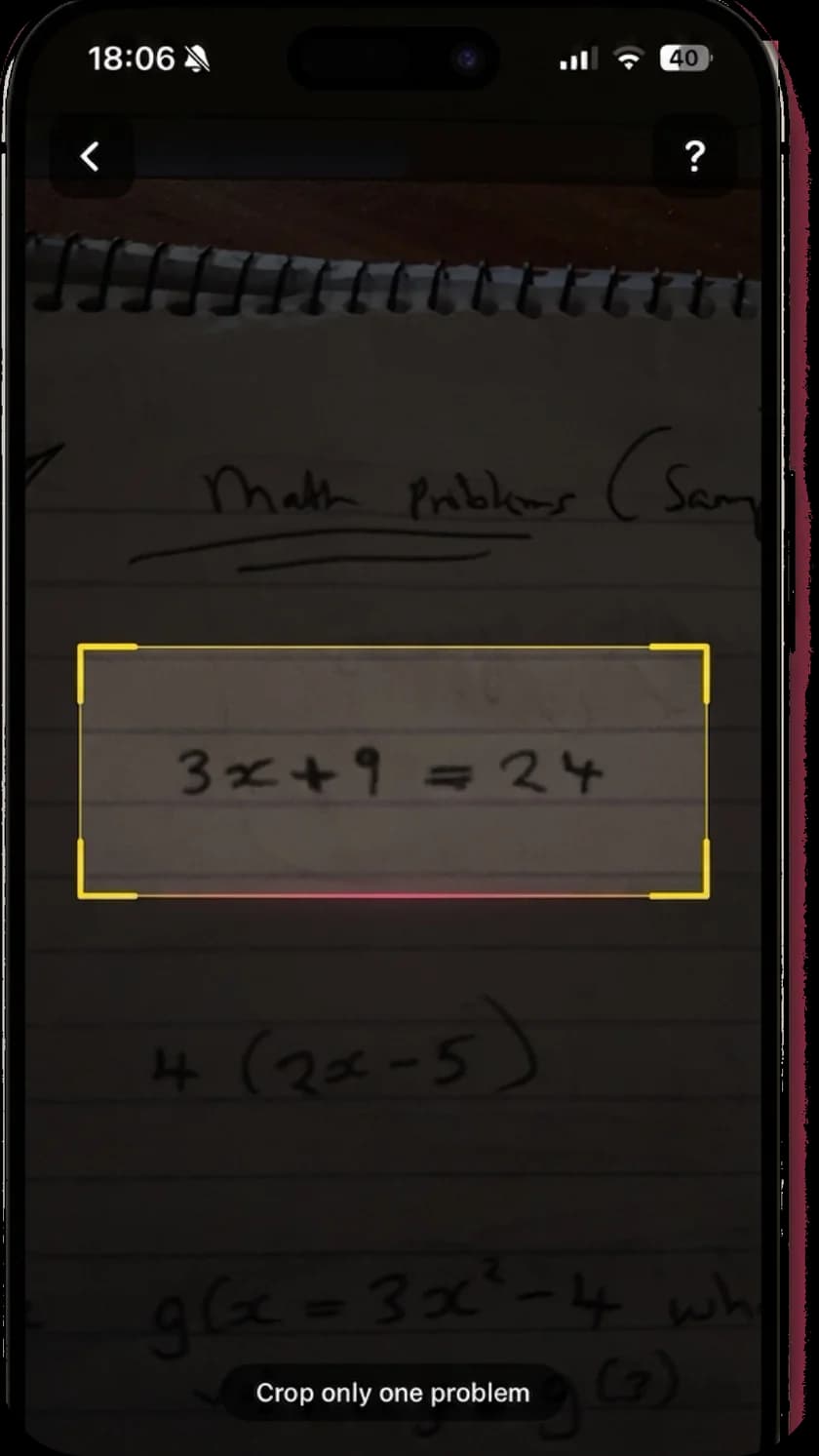
Frame it, then crop it
After you take the photo, MathScans freezes it and lets you drag the corners until only your problem is inside. If the picture is no good, you retake it before anything is solved.
There is a flash button for dim rooms, and you can pick a photo or screenshot from your library instead.
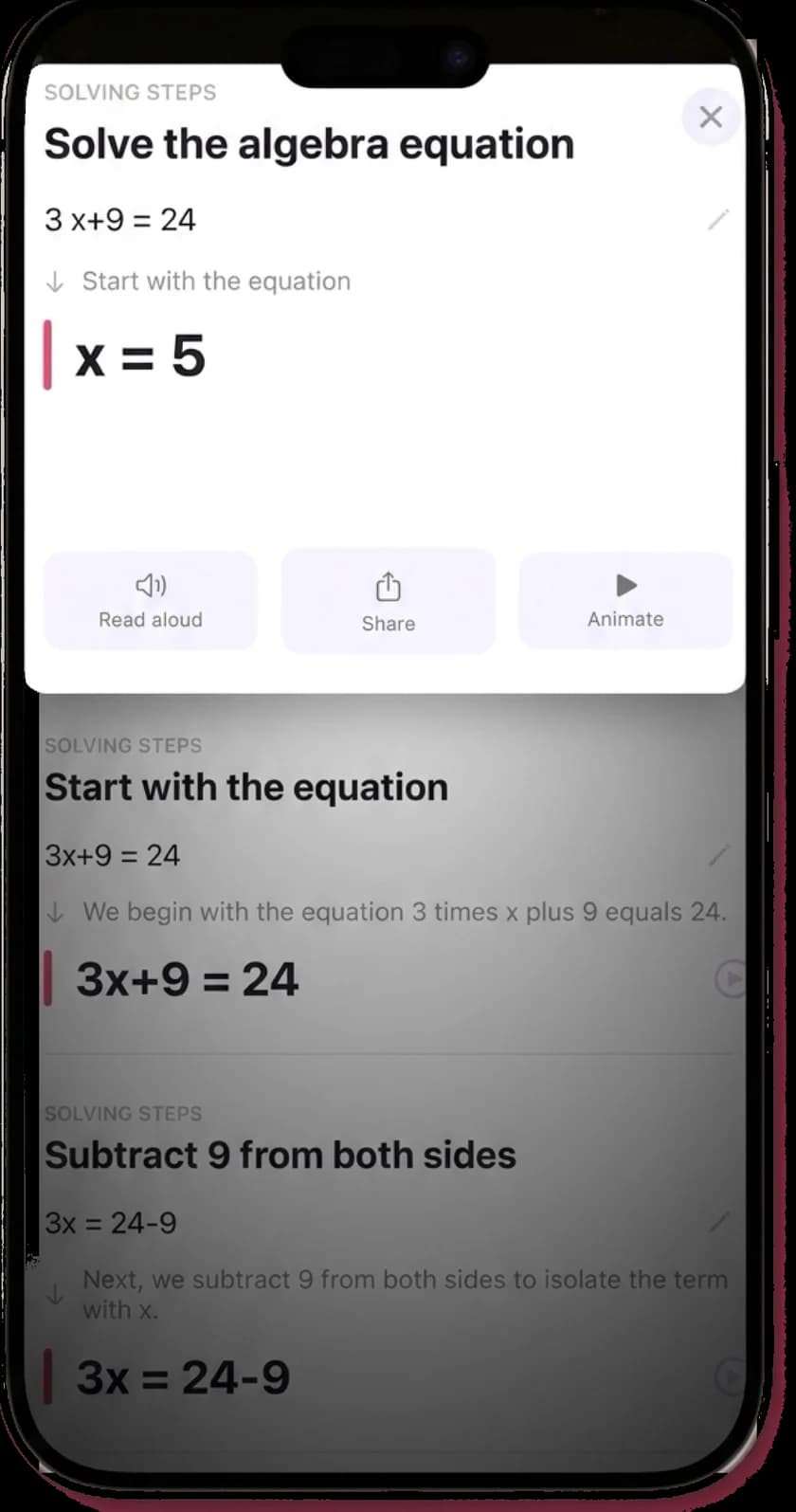
Check what it read
Every solution opens with the problem as MathScans read it. If a 3 became an 8, you see it straight away instead of trusting the wrong answer.
Below that, each step names the operation and explains why it was the right move.
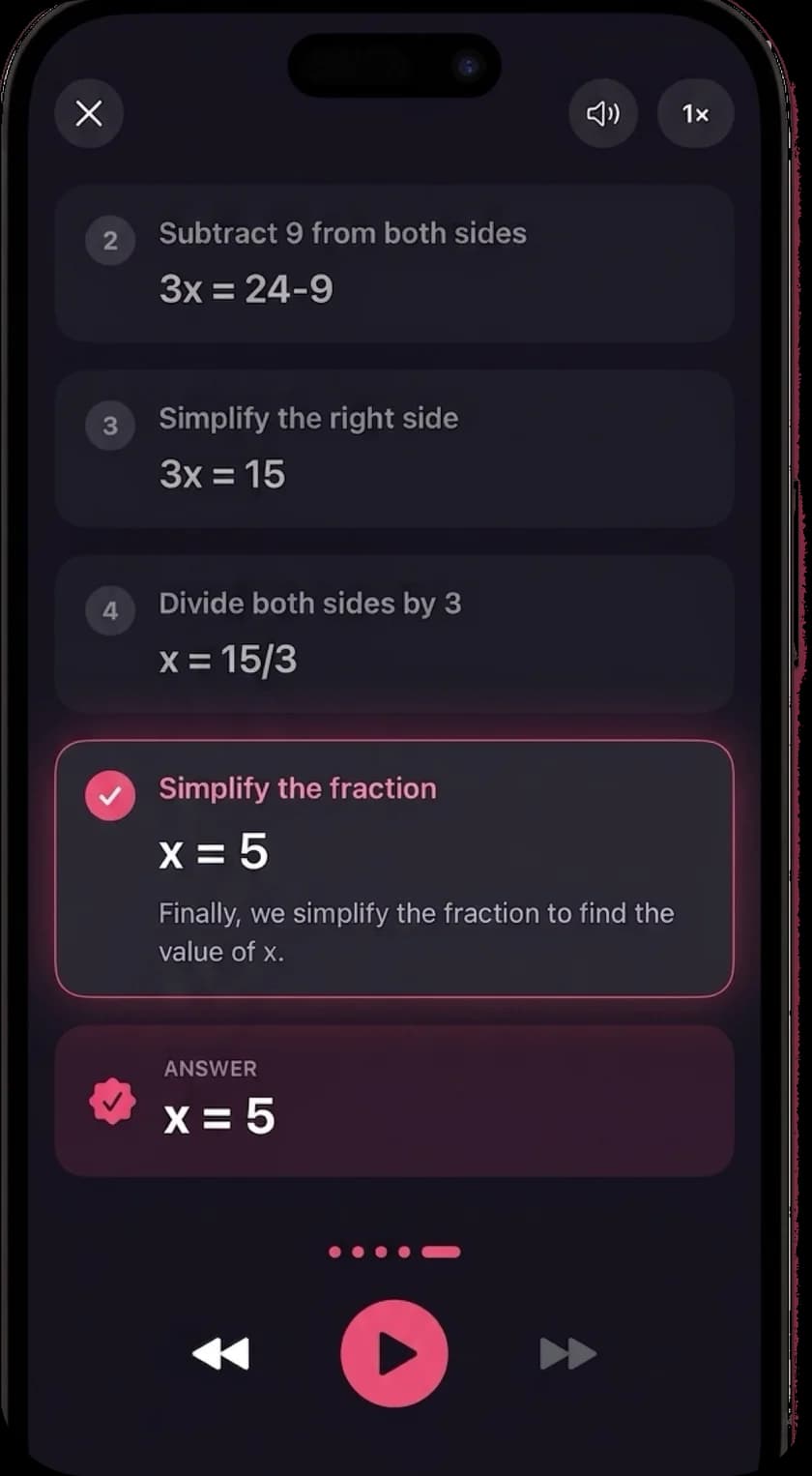
Watch it and hear it
The answer comes first, then the full steps on demand. Animate plays each change to the equation in turn, and Read aloud narrates the whole solution.
Narration works in any of 19 languages, using your iPhone's built-in voices.
Using a photo solver without just copying
A photo solver is quickest when you are stuck, and least useful when it does your homework for you. Try the problem first, then photograph it when you hit a wall.
Read the step where your working went wrong, close the app, and try the next problem yourself. If you can solve a similar one unaided, the solver did its job. If you cannot, scan it too and compare the two solutions side by side.
For parents, our math app for parents page covers how to use one alongside your child.
Questions about photo math solvers
- Can I take a picture of a math problem and get the answer?
- Yes. A photo math solver app reads the problem from your camera and solves it. Most also show the steps, though some only show the final answer unless you pay. Frame one problem at a time and crop tightly for the best results.
- What is the best photo math solver?
- For a free option, Photomath is the strongest, with steps included at no cost. For a quick check without installing anything new, Google Lens works. If you want every step explained, animated and read aloud on iPhone, try MathScans.
- Is there a free photo math solver?
- Yes. Photomath and Google Lens are free, and Photomath's free version shows step-by-step solutions. Mathway also reads photos for free but shows only the answer without a subscription.
- Are photo math solvers accurate?
- Mostly, as long as the photo is clear. The usual errors come from misreading the photo, not from the math itself. A clean crop around one problem fixes most of them, and checking the problem the app read back catches the rest.
- Can a photo math solver read handwriting?
- The good ones can. Handwriting is harder than print, so write exponents and fractions clearly, keep one problem in the frame, and check the problem the app read back before you trust its answer.
- Can I solve a math problem from a screenshot?
- Yes. Most photo solvers, including MathScans, let you choose an image from your photo library, so a screenshot of a slide, worksheet or message works the same way as a camera photo.
- Is Photo Math the same as Photomath?
- Photomath is one specific app, owned by Google. A photo math solver is any app that solves math from a picture, and Photomath is one of several. Our Photomath alternatives page compares them.
- Is MathScans free?
- No. MathScans costs $9.99 a month with a 3-day free trial, or $4.99 a week. Every explanation, animation and narration is included in both plans.
Keep reading
- Math scannerHow the scanner reads, crops and solves your problem.
- Best math solver apps comparedFive apps side by side, with the catch in each.
- Photomath alternativesIs Photomath free, and which apps like it are worth paying for.
- Math solver with stepsHow each step is explained, animated and narrated.
- AI math solverHow the AI reads your problem and solves it.
- Algebra solverEquations, factoring and systems, explained.
Point your camera at the next one.
Try MathScans free for 3 days on the monthly plan. After that it is $9.99 a month or $4.99 a week. Cancel any time in Settings.