Comparison, updated October 2026

The best apps to solve math problems, compared honestly.

Every math solver in the App Store promises the same thing: point your camera, get the answer. Once installed, they differ a lot. Some explain every step for free, some hide the working behind a subscription, and two well known names no longer exist.

This guide covers the five apps worth installing in 2026, what each is genuinely best at, and the catch with each. It is written for students and parents who want working they can learn from, not just a number to copy.

Disclosure: MathScans is our own app.

We build one of the five apps on this list. To keep the comparison useful, every competitor fact comes from that app's own App Store listing, checked in October 2026. Where a competitor is the better choice, we say so plainly.

The five apps at a glance

The column that matters most is the second one. Whether you can see the working without paying is the biggest practical difference between these apps.

AppSteps without payingWorks onPriceApp Store rating
MathScansoursNo free tier. 3-day trial, then steps on every solutioniPhone$9.99/mo or $4.99/wkToo new to be rated yet
PhotomathYes, basic steps are freeiPhone, iPad, AndroidFree, Photomath Plus is paid4.8 from 733K ratings
MathwayAnswers only, steps need a subscriptioniPhone, iPad, Android, webFree answers, paid steps4.9 from 425K ratings
SymbolabBasic steps free, detailed steps paidiPhone, iPad, Android, webFreemium4.6 from 26K ratings
GauthLimited, Gauth Plus for unlimitediPhone, iPad, AndroidFree, Gauth Plus is paid4.8 from 1.5M ratings

Ratings and prices were read from each app's US App Store listing in October 2026 and change often. Check the listing before you subscribe.

What actually separates a good math solver

We judged each app on four things that decide whether it helps you learn or just hands over an answer. None of them show up in App Store screenshots, which all look the same.

If you want to run the same checks yourself, our guide on how to pick a math solver for iPhone walks through each one in about five minutes.

It reads your handwriting

Printed textbook problems are the easy case. The real test is your own writing on lined paper, at an angle, in poor light.

It explains each step

A list of equations shows what happened. An explanation tells you why, and the why is what you need in a test.

It covers your course

Almost every app is strong on algebra. Coverage gets thinner at calculus, statistics and word problems.

It is honest about price

Many apps answer for free, then charge at the moment you want the working. Know what sits behind the paywall before you install.

3x + 5 = 4
Σ

SOLVING STEPS

Linear Equation

x = −⅓
1Subtract 5 from both sides3x = −1
2Divide both sides by 3x = −⅓

ANIMATED TUTORIAL

3x+ 5= 4
The three jobs a good solver does well: read the problem, explain each step, and teach the method behind it.

Best for learning by watching and listening

MathScans

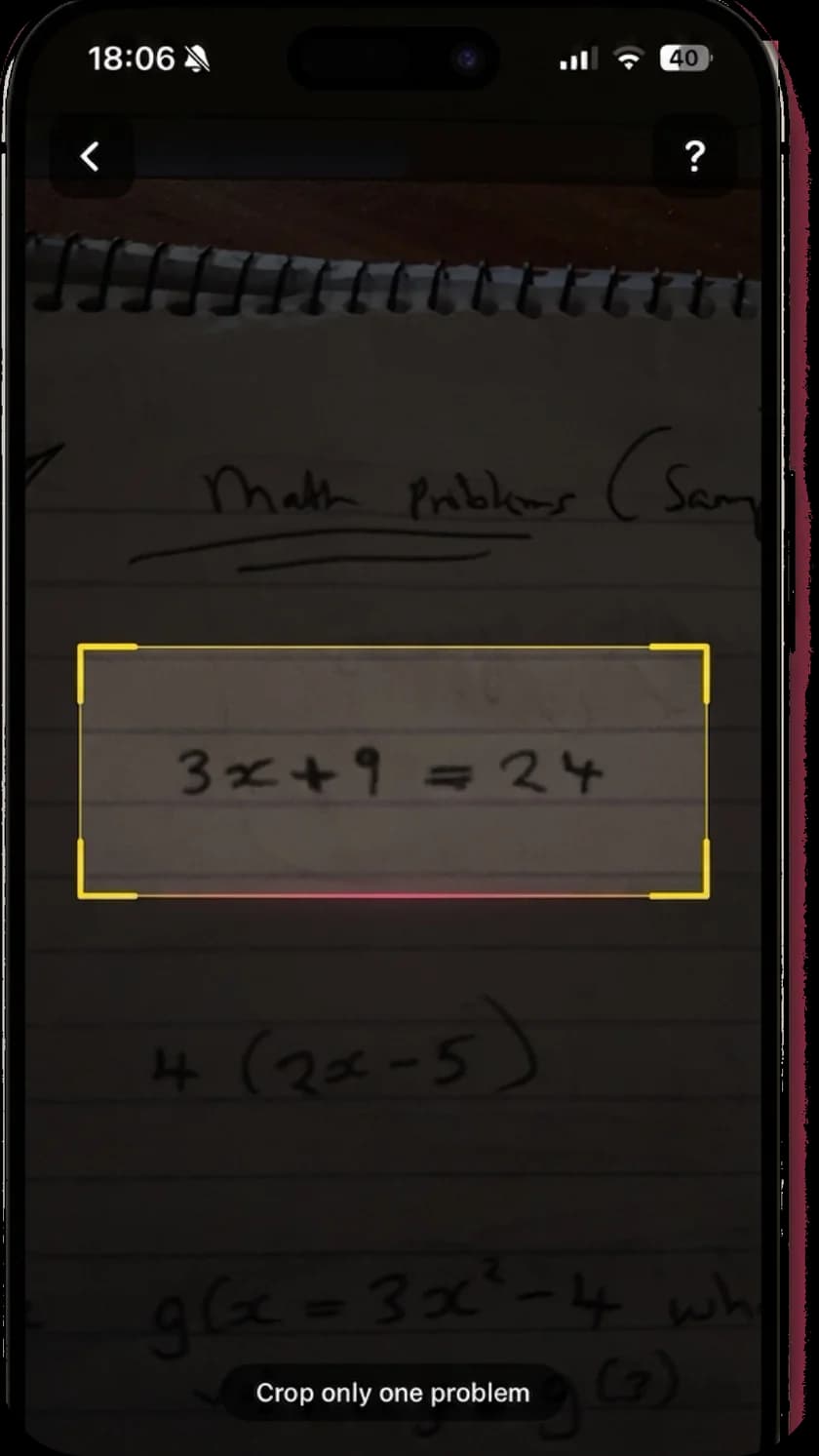
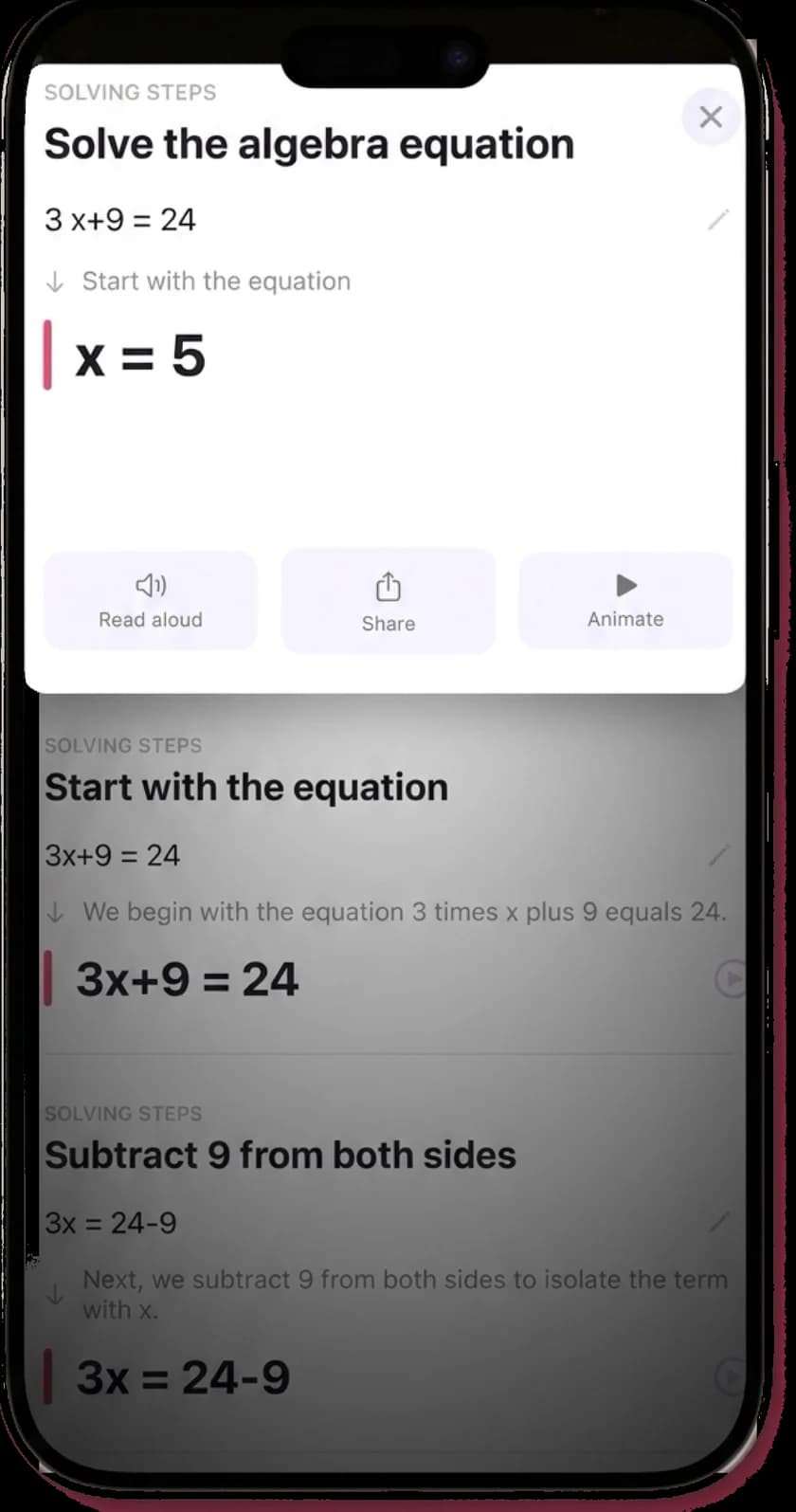
MathScans is a newer, focused app: math only, iPhone only, built around explanations. You scan a printed or handwritten problem and get a typeset solution where every step says what was done and why.

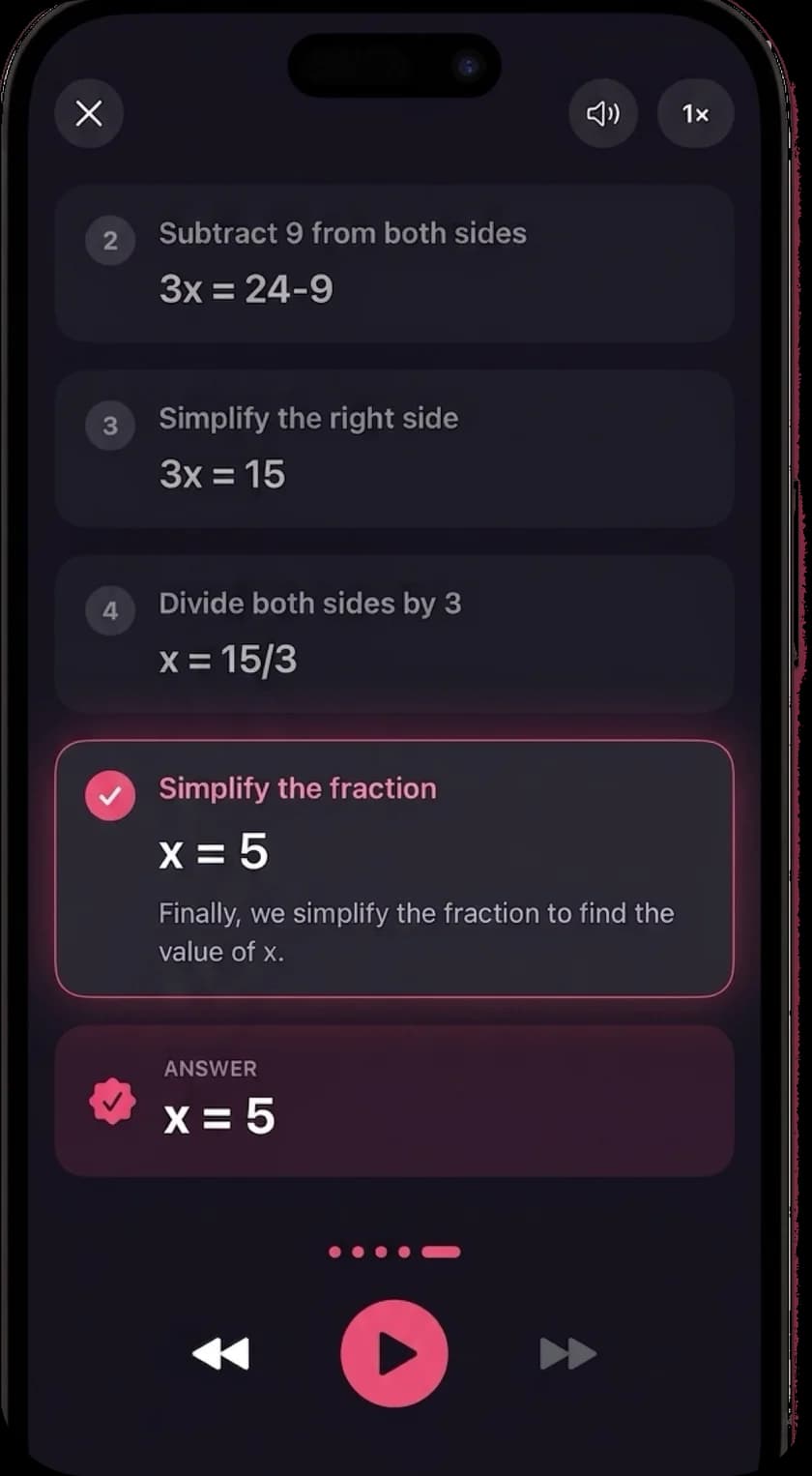
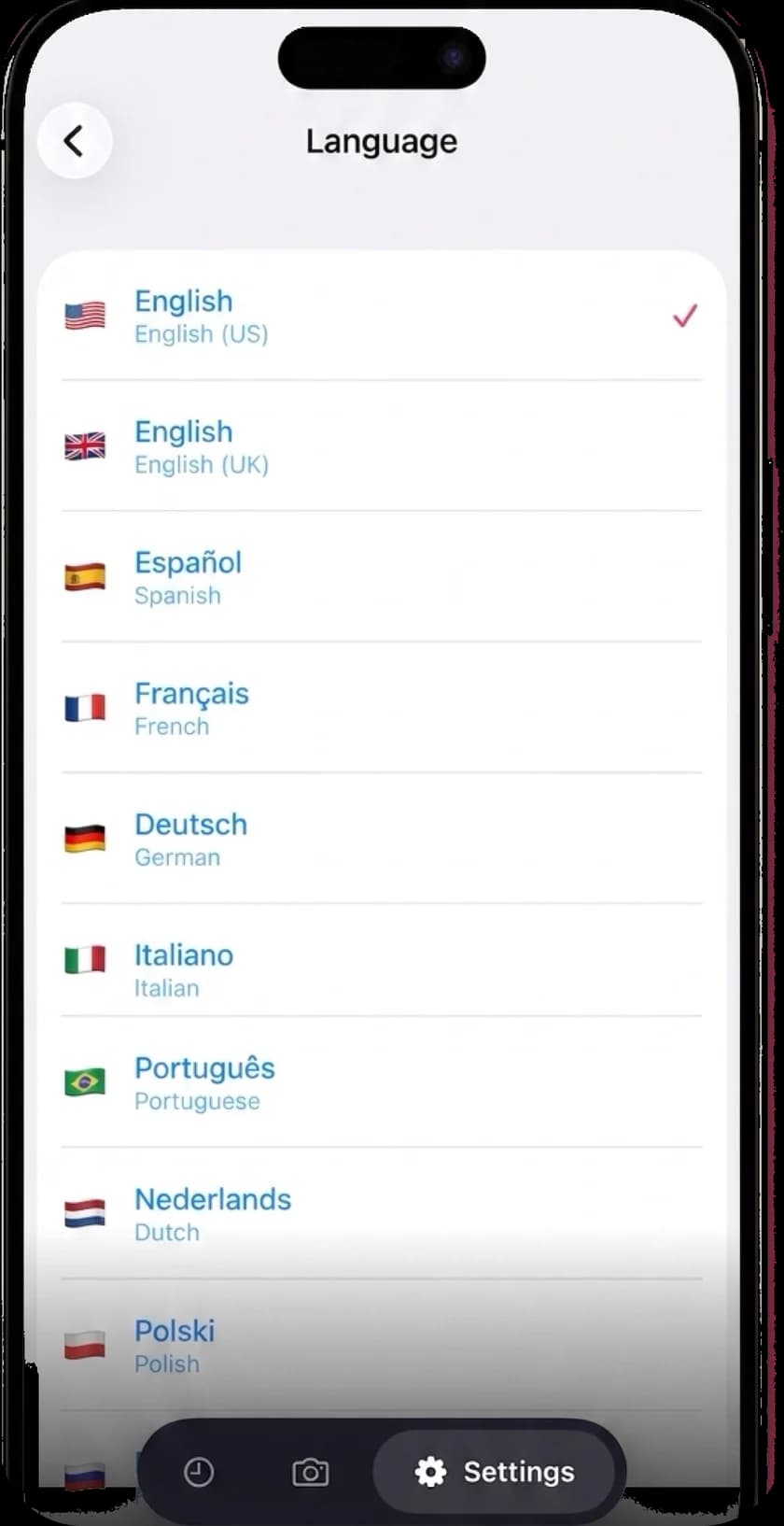
Each step can play as an animated walkthrough. Photomath animates steps too, but MathScans also narrates every step of every solution aloud, in any of 19 languages. That helps if you study by listening or work in a second language.

It covers arithmetic, fractions, algebra, geometry, trigonometry, calculus, statistics and word problems. Your solutions stay in a 30-day history, and there are no ads.

The catch: there is no free tier. MathScans needs a subscription after a 3-day trial on the monthly plan, runs on iPhone only, and is too new to have App Store ratings. If you need something free or on Android, start with Photomath.

A MathScans solution with each step shown as typeset math and a plain-language explanation underneath

Best free option

Photomath

Photomath, owned by Google, is the benchmark in this category. It holds a 4.8 rating from about 733,000 App Store reviews, carries an Editors' Choice badge and supports 32 languages.

Its biggest strength is that basic step-by-step explanations are free. It also handles word problems, draws interactive graphs and now animates individual steps. Photomath Plus adds animated tutorials and textbook solutions for a fee.

The catch: The free steps are deliberately basic, and the deeper explanations live in Plus. If you have outgrown the free tier, our Photomath alternatives page compares where to go next.
Best for breadth of problem types

Mathway

Mathway, owned by Chegg, has a 4.9 rating from about 425,000 reviews and runs on iPhone, iPad, Android and the web. It covers a very wide range, from basic math through calculus, statistics and physics.

You can snap a photo or type a problem, and there is a graphing calculator built in. Typing is handy when you want to ask for a specific method, such as factoring rather than the quadratic formula.

The catch: The free version gives you the answer, and the step-by-step working needs a subscription. That gap is the most common reason people look for a Mathway alternative.

Best for typed input and advanced calculus

Symbolab

Symbolab is built on more than 500 calculators, from derivatives and integrals to matrices, series and Laplace transforms. It works on the web as well as iPhone, iPad and Android, with a 4.6 rating from about 26,000 App Store reviews.

It shines when you type a problem precisely. College calculus students in particular tend to value the depth of its symbolic working.

The catch: Free solutions come with basic steps, and the more detailed explanations need a subscription. The camera works, but Symbolab is most at home with typed input, which is why some students look for a Symbolab alternative built around scanning.

Best for homework across every subject

Gauth

Gauth is an all-subject study app with a 4.8 rating from about 1.5 million reviews. Beyond math it covers biology, physics and chemistry, and it adds an AI voice tutor, flashcards and access to human experts.

If you want one app for all of your homework, it does more than anything else here. Gauth Plus adds unlimited detailed explanations and priority expert help.

The catch: That breadth costs focus. At over 200 MB, with writing tools, study timers and quiz makers, it is a far bigger app, and math is one subject among many. Students who only need math often look for a Gauthmath alternative.

What happened to Microsoft Math Solver, Socratic and Cymath?

Older lists of the best math apps often include these. None of them is available as an iPhone app right now, which is why they are not in our table.

Microsoft retired Math Solver on July 7, 2025, and now points users to Math Assistant in OneNote, which needs a school or work Microsoft 365 plan. Our Microsoft Math Solver alternative guide covers what to use instead. Google removed the Socratic app from the app stores, and its photo homework help now lives inside Google Lens.

Google Lens is free and handy for a quick check, but it is a general visual search tool rather than a dedicated math app. If you used Socratic mainly for math, any of the five apps above will give you more detailed working. Our Socratic alternatives guide covers what to use now.

The Cymath iPhone app was not on the US, UK, Canadian or Australian App Store when we checked on October 25, 2026, though cymath.com still works in a browser. Our Cymath alternative guide explains how to keep using it on iPhone, and what to try instead.

Which one should you install?

If it has to be free

Install Photomath. Its free tier already includes step-by-step explanations, and it is the most proven app on this list.

If you want the working, explained, on iPhone

Try MathScans. Every solution is explained step by step, animated and read aloud, and the 3-day trial lets you test it on your own homework before you pay.

If you type problems or study advanced calculus

Use Symbolab. Its calculators go deep, and the web version means you are not tied to your phone.

If you need every subject, not only math

Look at Gauth. It covers the sciences too and adds human experts when the AI is not enough.

If you mostly check answers

Mathway's free tier gives you answers across a huge range of problems. Pay only if you find you need the steps.

The MathScans language settings screen listing English, Spanish, French, German, Italian and more

Questions about math solver apps

What is the best app to solve math problems?
It depends on what you need from it. Photomath is the best free option and includes basic steps, Mathway covers the widest range of problems, Symbolab is strongest for typed calculus, and Gauth covers every subject. MathScans is built for iPhone users who want each step explained, animated and read aloud.
Are there any good free math apps?
Yes. Photomath's free tier shows step-by-step explanations, Symbolab gives free basic steps, and Mathway gives free answers. Google Lens is also free for quick checks. MathScans is not free: it needs a subscription after a 3-day trial on the monthly plan.
Which math solver app shows steps for free?
Photomath shows basic steps for free. Symbolab shows basic steps too, with more detail behind a subscription. Mathway's free version shows the answer only.
What is the best math solver app in the UK or Australia?
The same apps lead in the UK, Australia and Canada as in the US, because the math itself is the same. Prices are set in local currency, so check your own App Store listing before subscribing.
Are Microsoft Math Solver and Socratic still available?
No. Microsoft retired Math Solver on July 7, 2025 and points users to Math Assistant in OneNote. Google's Socratic app was removed from the app stores, and its photo homework help now lives in Google Lens.
Is using a math solver app cheating?
It depends on how you use it. Copying an answer is no different from copying a classmate's homework. Reading the explanation for the one step you got stuck on is closer to studying a worked example, which is why an app that explains each step is the better choice for learning.

See if the explanations click for you.

Try MathScans free for 3 days on the monthly plan. After that it is $9.99 a month or $4.99 a week. Cancel any time in Settings.