AI math solver for iPhone
An AI math solver that explains, not just answers.
Point your camera at a problem and the AI reads your handwriting, works it out one step at a time, and checks its own answer.
Every step comes with the reason behind it. Watch it animate, or hear it read aloud.
What the AI does between the photo and the answer
“AI math solver” covers a lot of very different apps. Some send your photo to a chatbot and show whatever comes back. Others are calculators with a camera bolted on.
MathScans splits the job into stages, and you are part of one of them. Here is the whole path a problem takes.
01
Read
A model trained on math notation turns your photo into an equation, handwriting included.
02
You confirm
You crop the photo before solving, and the solution opens with the problem as it was read.
03
Solve
The AI works one operation per step, using only as many steps as the problem needs.
04
Check
It substitutes the answer back, and if the final answer is plain arithmetic, code recomputes it.
05
Explain
Tap Show Solving Steps and each step gets a plain-language reason, ready to animate or read aloud.
Reading and solving are separate on purpose. A model built for math notation is far better at telling a 2 from a z, or an exponent from a coefficient, than a general model looking at the whole photo.
The explanations are written only when you ask for them. That keeps the answer fast, and the reasoning arrives when you tap Show Solving Steps.
What the AI adds to a bare answer
A calculator returns x = 2, 3 and stops. Here is how MathScans reads and explains x² − 5x + 6 = 0, so you can see what the AI is actually for.
- 01
Read the problem
x² − 5x + 6 = 0
The AI recognizes the scanned equation, prints it back in clean notation, and identifies it as a quadratic set equal to zero, which is what tells it to look for factors.
- 02
Factor the quadratic
(x − 2)(x − 3) = 0
It looks for two numbers that multiply to 6 and add to −5. Those are −2 and −3, so the quadratic splits into two brackets. The explanation names that search, so you can do it yourself next time.
- 03
Apply the zero-product rule
x − 2 = 0 or x − 3 = 0
If two things multiply to zero, at least one of them is zero. That turns one quadratic into two simple equations.
- 04
Solve each bracket
x = 2 or x = 3
Each small equation gives one solution. A quadratic has two, and here they are.
Explanations pitched at your level
The same step can be explained to a ten-year-old or to a university student, and the right version depends on who is reading. You pick a level when you set up the app.
You can change it any time under Math level in Settings. The math stays the same; the wording and notation in the explanations change.
Arithmetic
5 × ½
Very simple wording, no algebraic notation
Basic Algebra
3x + 5 = 4
Standard algebra language, the default
Intermediate Algebra
the quadratic formula
Functions, factoring and quadratics named freely
Calculus
∫ x² dx
Derivative, integral and limit notation used freely
Where AI solvers go wrong, and what MathScans does about it
AI can be confidently wrong. Anyone choosing a solver should know the three ways it usually happens.
None of the checks below make the app infallible. They make the common failures rarer and easier to spot.
It reads the problem wrong
You crop before solving, and every solution starts with the problem as read, so a misread exponent is visible before you trust anything.
A value drifts between steps
The solver is held to one value per variable throughout, and the final answer must match the last step exactly.
The arithmetic is simply false
When the answer is a plain numeric equation, both sides are evaluated in code. If they disagree, the problem is solved again.
Your own best check costs a few seconds. Put the answer back into the original problem and see whether it holds. Our math scanner page shows how to fix a scan that was read wrong.
A chatbot, a calculator, or a dedicated AI solver?
Plenty of students now paste math into a general chatbot. It can give a good explanation, and for a one-off question that may be all you need.
The trouble comes with regular homework. Replies change shape each time, and nothing checks the arithmetic before you read it.
| Tool | Input | Working | Answer | Animated steps |
|---|---|---|---|---|
| General AI chatbot | Photo or typed | A paragraph of prose | Varies from reply to reply | No |
| Calculator-style solver | Typed | Usually answer only | Same answer each time | No |
| MathScansours | Photo, print or handwriting | One labelled step per operation | Checked before you see it | Yes, plus read aloud |
General categories, not specific products. Individual chatbots and calculators vary.
For named apps, including Photomath, Symbolab and Gauth, see our best math solver apps comparison. It covers what each one charges and where each one is the better pick.
What the AI's working looks like in the app
Structured, not a wall of text
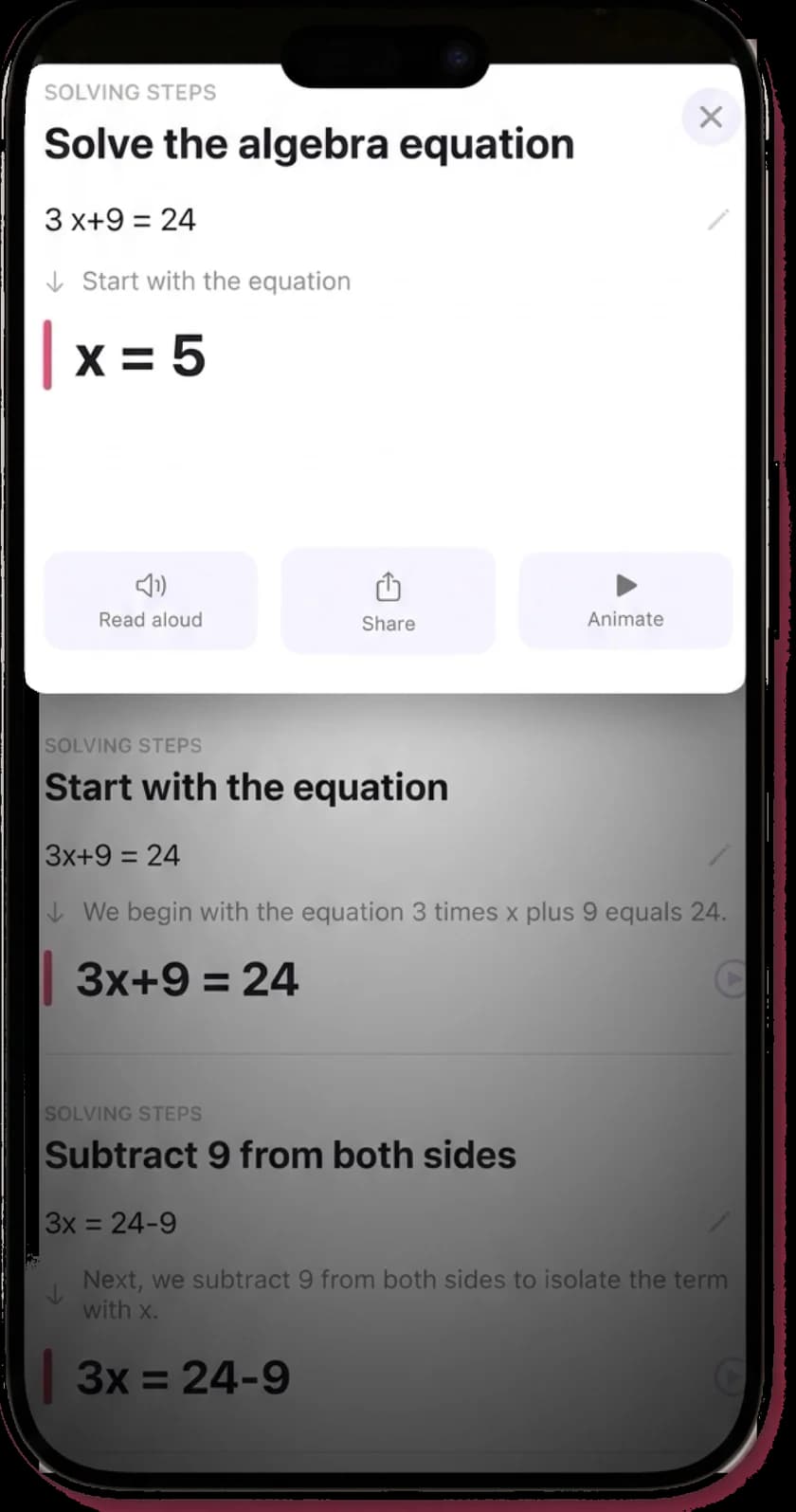
Each step shows the state of the problem, a short label for the operation, and the reason underneath.
You can scan down the labels to see the method at a glance, then read the reason only where you got lost.
The AI tracks every term
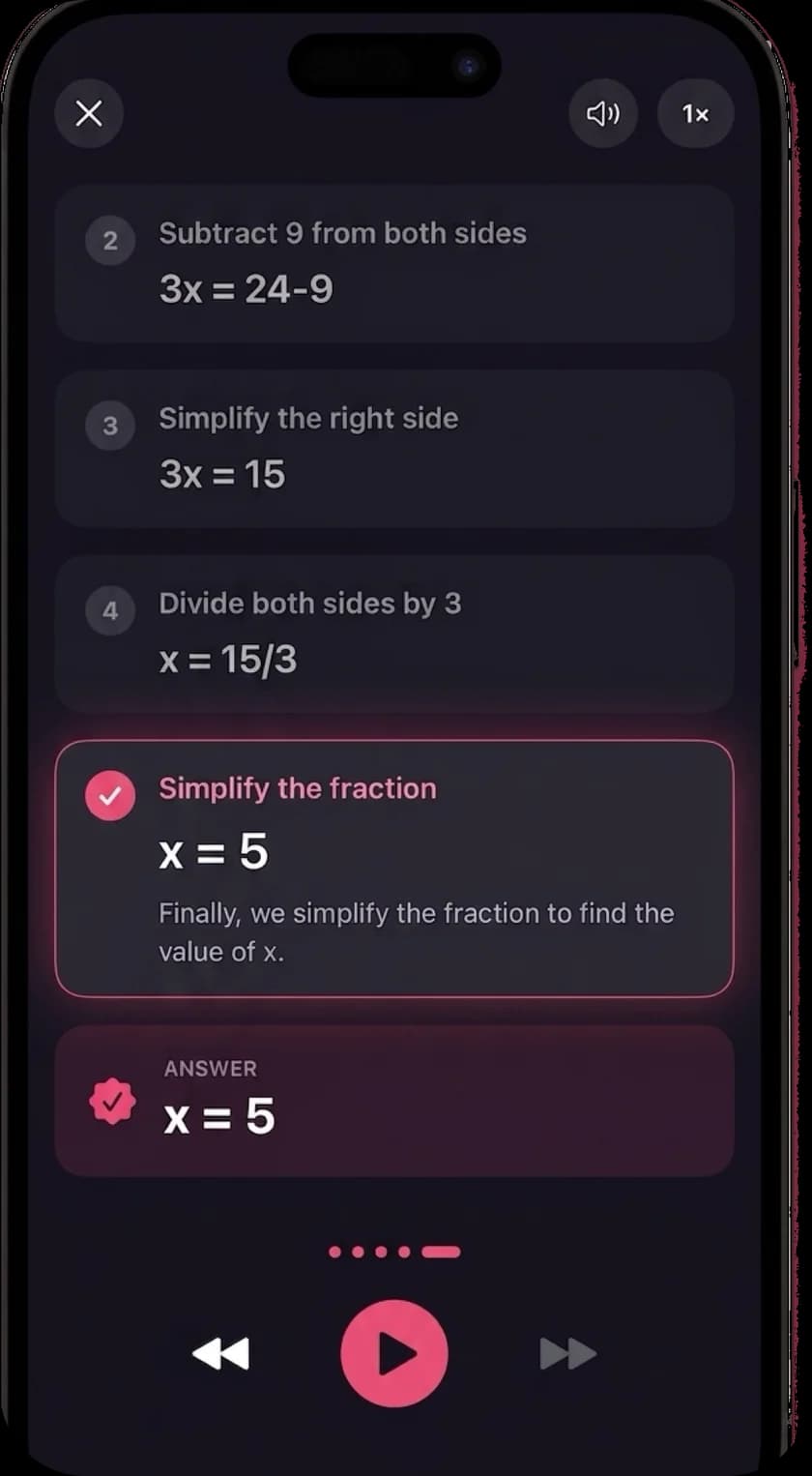
Because the AI keeps track of which term becomes which from one step to the next, the player can animate terms moving and combining.
Changed terms are highlighted, so your eye goes straight to what happened.
Explanations you can hear
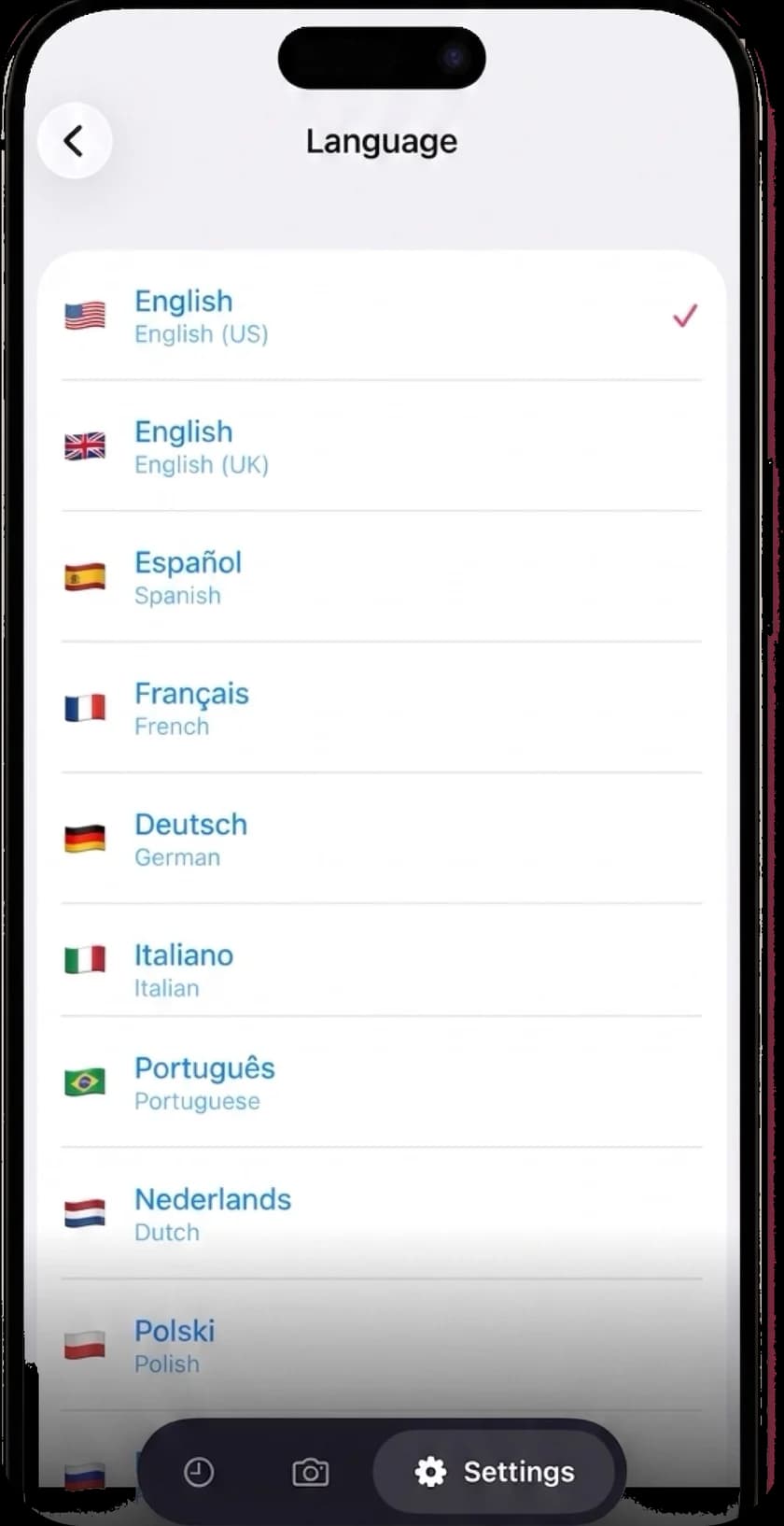
Read aloud narrates the explanation in any of 19 languages.
That helps if you learn better by listening, or if your math class is taught in your second language.
Using an AI solver to learn, not to copy
The best AI math solver is the one you come away from understanding the problem. Copying the steps into your book teaches nothing and will not survive a test.
A better routine is to try the problem first, then scan it and find the first line where your working and the AI's part ways. Read that one explanation closely.
Then cover the screen and try a similar problem on your own. If you get stuck again in the same place, you have found the rule you need to practise.
Parents can use the same routine to help with homework they last saw years ago. Our math app for parents page covers that in more detail.
Questions about AI math solvers
- What is the best AI math solver app?
- The one that explains its reasoning rather than only printing an answer, because an answer you cannot follow is no use in an exam. MathScans reads the problem with AI, shows every step, names the rule it used, and explains why. Try it free for 3 days and judge the explanations on your own problems before you decide.
- How does an AI math solver work?
- MathScans works in two stages. First, a model trained on math notation turns your photo into an equation. Then a language model solves it one operation at a time, checks the answer by substituting it back, and writes a plain explanation for each step.
- Is an AI math solver accurate?
- Usually, but not always, and any app that says otherwise is overselling. The most common failure is a misread scan, which is why every MathScans solution opens with the problem it read. The app also checks its own answer, and recomputes the final line in code when it is plain arithmetic. Substituting the answer back into the original takes a few seconds and is worth doing.
- Is it better than asking ChatGPT?
- A chatbot can explain math well, but the format changes from one reply to the next and nothing checks the arithmetic before you read it. MathScans always returns the same structure, one labelled step per operation, with an automatic check on the answer. It also animates and narrates the steps, which a chatbot does not.
- Can I change how simple the explanations are?
- Yes. In Settings, Math level offers Arithmetic, Basic Algebra, Intermediate Algebra and Calculus. Lower levels keep the wording very plain, and higher levels use notation such as derivatives and integrals freely.
- Is there a free AI math solver, and is MathScans free?
- There are free AI solvers, and some show steps, so if not paying is your only requirement you have options. MathScans opens with a 3-day free trial on the monthly plan. After the trial it is $9.99 a month or $4.99 a week, cancellable any time in Settings.
- Does the AI need an internet connection?
- Yes. Reading and solving happen on our servers, so scanning needs a connection. Your past solutions are saved to your account for 30 days and then deleted automatically.
- Is MathScans available on iPhone and Apple devices?
- Yes. MathScans is an iPhone app and requires iOS 17 or later. It runs on iPad in iPhone compatibility mode, though it is not yet optimized for the larger screen, and there is no Android version at present.
Keep reading
- Photo math solverTake a picture of a problem and get every step.
- Math scannerHow the scanner reads, crops and solves your problem.
- Math solver with stepsHow each step is explained, animated and narrated.
- Best math solver apps comparedFive apps side by side, with the catch in each.
- Algebra solverEquations, factoring and systems, explained.
- Calculus solverDerivatives, integrals and limits, every step named.
Let the AI show its working.
Scan a problem, read every step, hear it explained. Free for 3 days on the monthly plan, then $9.99 a month.